
WizTree Download
The FASTEST Disk Space Analyzer
Use WizTree to find the files and folders using the most space on your hard drive in seconds. Scan NTFS, FAT, FAT32, network and USB drives, then quickly locate large files, duplicate files, and space-hogging folders.
WizTree is free for personal use, with fast installer and portable downloads available for Windows.

WizTree is used and trusted by many large organizations because it helps teams scan drives quickly, find large files, and understand disk usage visually:
Meta Platforms (facebook), Rolex, Valve Software, CD Projekt Red, Activision, U-Haul, Square Enix, Panasonic, Nvidia, KPMG, ZeniMax Media, ...
... and more!
View the size of all files and folders visually
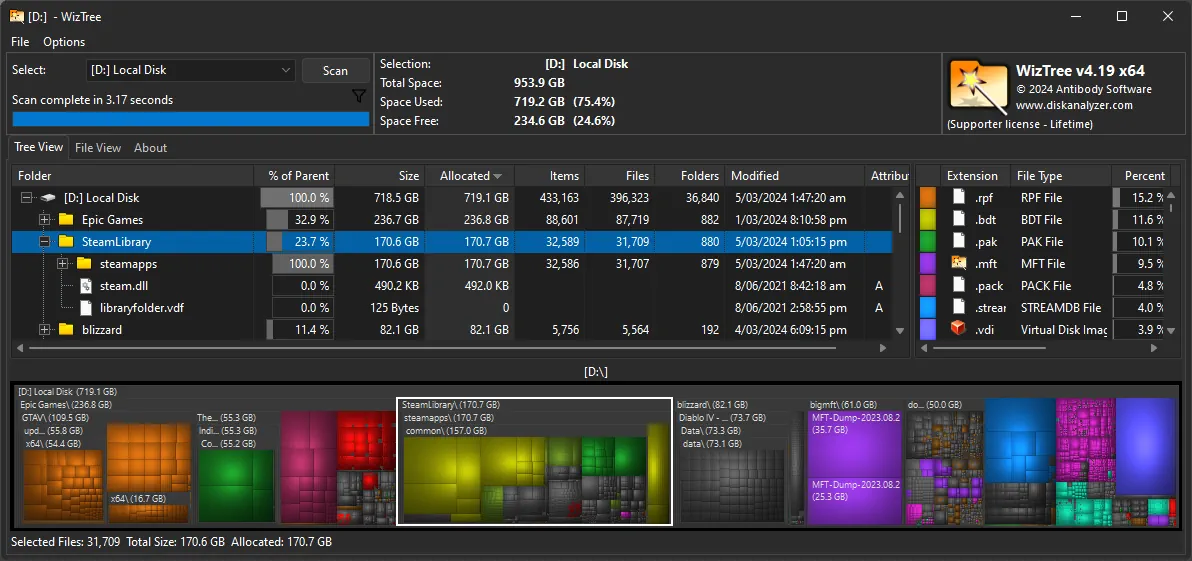
See WizTree in action
Click scan to see how fast WizTree finds the files taking up your disk space.
Why use WizTree?
Free up your disk space
WizTree helps you free up disk space by showing exactly which files and folders are using the most storage. The visual treemap makes large files, old backups, installers, videos, and other space hogs easy to spot, so you can clean up your Windows drive with more confidence and less guesswork.
Save Time
WizTree saves time by scanning supported drives extremely fast. Instead of waiting minutes for a traditional disk space analyzer, you can open WizTree, scan a drive, and start finding large files, oversized folders, and duplicate content in seconds.
Regular updates
WizTree is in active development and new features are added regularly. Ongoing updates help keep WizTree useful for modern Windows systems, while improvements to scanning, search, filtering, and export tools make the software more practical for both everyday cleanup and advanced file analysis.
It's FAST
When scanning NTFS formatted drives, WizTree reads the hard drive's Master File Table directly from disk for exceptional speed. This gives WizTree a major advantage over many other disk space analyzer tools for Windows, while still allowing it to scan non-NTFS drives, network locations, and other supported storage devices.
It's ACCURATE
WizTree is not only fast, it is accurate. It correctly handles hard linked files and reports allocated space in a way that matches what Windows reports, helping you make better cleanup decisions when reviewing disk usage, comparing folders, or deciding which files can be safely removed.
It's FREE
WizTree is free for personal use, which makes it easy to download WizTree and start scanning your PC right away. If you want to support development or use WizTree commercially, Supporter and Enterprise licensing options are available for individuals, teams, and larger organizations.
WizTree
Disk Space Analysis
Use WizTree for disk space analysis on Windows and quickly see what is using storage on your hard drive. You can identify large files, oversized folders, old downloads, and unnecessary data, then decide what to remove to free up space without wasting time clicking through folders manually.
Extremely Fast!
WizTree reads the Master File Table directly from NTFS formatted drives, which is one of the reasons it is so fast. This approach lets WizTree deliver near-instant visibility into disk usage and helps you find large files much faster than many traditional Windows disk analyzer tools.
Multiple File Systems
WizTree can scan all hard drive types supported by Windows, including NTFS, FAT, FAT32, network drives, and more. MTP/PTP devices such as smartphones and cameras can also be scanned when connected via USB, making WizTree useful across a wide range of storage devices and workflows.
Visual Treemap
The WizTree visual treemap displays files and folders based on size, so you can understand disk usage instantly. It is one of the fastest ways to find large files, hidden storage hogs, and unusual file patterns on a busy Windows system without opening folder after folder.
Find Largest & Duplicate Files
The "File View" lists every file and folder on your hard drive in size order, helping you find the largest files quickly. WizTree can also locate duplicate files based on name, size, and optionally date, making it easier to clean up media libraries, backups, and repeated downloads.
File Name Search
Quickly locate files by name or type using the file view search filter. Wildcard searches are supported, so you can search for file groups such as *.mp3, narrow results by pattern, and use WizTree to find specific files on large drives without waiting for slow directory browsing.
Export File and MFT Data
All or selected file information can be exported to CSV files or copied to the clipboard. MFT files can also be extracted and dumped to a file, which makes WizTree useful for reporting, documentation, technical support, and deeper inspection of file system data.
Import File and MFT Data
Exported CSV and dumped MFT files can be imported back into WizTree for viewing. This is useful for comparing scans over time, reviewing how disk usage has changed, checking the results of cleanup work, or keeping historical snapshots of important Windows systems and storage volumes.
Command Line Support
WizTree also supports command line usage for exporting CSV and MFT data. This is useful for IT teams, automated storage audits, repeatable disk checks, and advanced Windows workflows where fast disk analysis needs to be scheduled, scripted, or integrated into existing maintenance processes.